
Quire Work Download
The feature tour

Everything Quire Work does.

Every feature on this page is built and ships in version 0.0.7, October 2026, written in the words the apps themselves use.

Quire Work on a computer: a room with photos, replies and its members

Notifications that arrive

Your server sends to Apple and Google itself, with the message's words inside. Nobody counts your notifications, and reading on one device clears the others.

Search without the accents

Type tien and find tiền. The whole history, file names included, narrowed by person, room, date and files.

A record nobody can quietly bend

Nothing is deleted on a clock. When the owner reads a private conversation, it takes a written reason and lands in a trail everyone who runs the workspace reads.

One app on every screen

The browser, Mac, Windows, Android and iPhone all draw the same app, so a new feature reaches every screen the same day.

Calls that ring like calls

Voice and video between two people, over your own server. A locked iPhone rings through CallKit, a locked Android phone shows a full call screen.

Opens with no signal

In a browser, on a desk and on Android the app opens offline and shows the newest messages of your last rooms, then catches up.

Talking

Rooms for teams, threads for side questions.

Everything a company says during the day, kept readable.
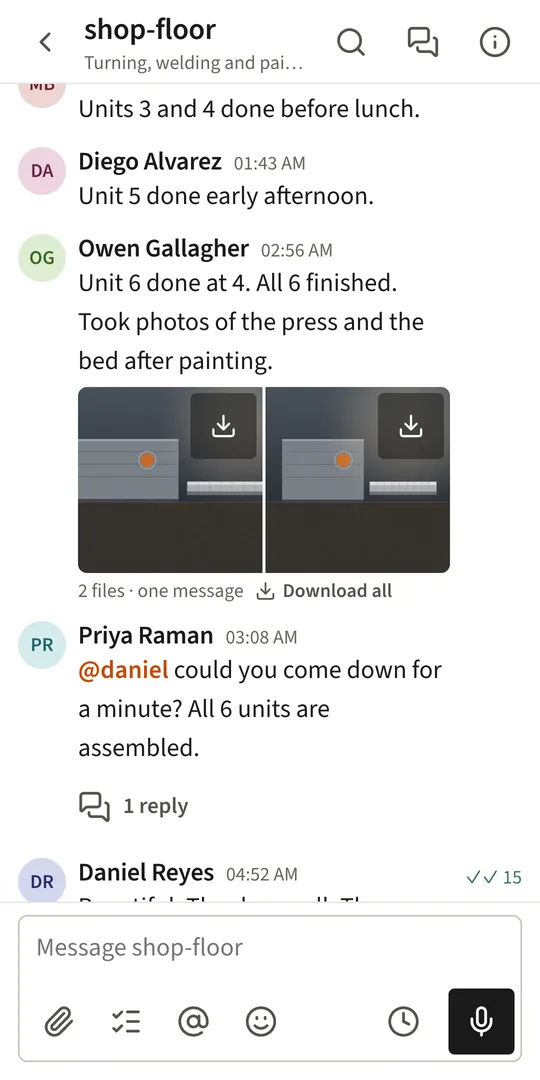
A room on a phone, with photos and replies
  • Five kinds of roomPublic and private channels, direct messages, group conversations, and announcement channels.
  • Announcements nobody can muteNobody can mute or leave an announcement channel, and by default only owners and admins post in it.
  • Threads"Reply in thread" keeps a side question out of the room; follow a thread to hear its replies, or "Also send to the channel".
  • Replies and quotesReply to a message, "Quote it", or forward it to another room or person with a note.
  • ReactionsThe whole emoji set, with the eight you use most first, drawn the same on Windows, Android and the desktop app.
  • FormattingBold, italic, strikethrough, code with colouring by language, quotes, lists and named links.
  • MentionsName a person with @, or the room with @channel; @here reaches only the people who have the app open.
  • Edit, with the history keptEdit within the workspace's window; "Edit history" shows every earlier version, "As it was sent" first.
  • A deleted message leaves a line"Lan deleted a message" stays in its place, and an owner can put the message back from the Trash.
  • Pin and keep"Pin to the channel" for everybody; "Keep this" bookmarks it for you on the Kept page.
  • Remind meA message comes back in 20 minutes, an hour, 3 hours, tomorrow morning or Monday morning.
  • Send laterSchedule a message for an hour from now, tomorrow morning, Monday morning or any time you pick.
  • Drafts follow youStart a message at the desk and finish it on the phone.
  • Voice messagesHold the microphone and speak; play back at 1×, 1.5× or 2×.
  • Link previewsA link shows its page's title and description, fetched by your server, never by every reader's browser.
  • Read bySee who has read a message, or only how many, as the workspace chooses.
  • Typing and presenceWho is typing, and who is online or away: one state across all of a person's devices.
  • A status of your own"In a meeting", "Out for lunch", "Working from home" or your own words, cleared after the time you choose.
  • A face for every roomA room has a picture; a direct conversation shows the other person's photograph.
  • Who came and wentA quiet line says who joined the channel and who added them.

Finding

Back where you were, and anything you said.

Built for a workspace with dozens of rooms and years of history.

  • Accents are optionalPlain letters find the accented word, in messages and in file names.
  • Narrow the searchBy who sent it, which room, the last 7 days to the last year, and whether it carried files.
  • Rooms and people by nameCtrl or Cmd+K jumps to any room, person or message.
  • Opens at the first unreadA room opens where you stopped reading and remembers where it was scrolled.
  • Back where you wereA reload or a restart of the app reopens the same room and thread.
  • Pages above the roomsUnreads, Activity, Threads, Kept and Work, each with a count that keeps up live.
  • ActivityWho named you, who reacted to what you wrote, and replies in threads you follow.
  • SectionsThe company's layout for everybody, plus sections of your own; drag rooms in, sort by recent or by name.
  • Only what is newFold a section to show only rooms with something new, or put unread rooms at the top.
  • Favourites, mute, mark unreadFrom any room's menu, and "Mark everything read" when you are back from leave.
  • Copy linkThe address of one message, which opens the room right at it.
  • Keys on a deskAlt+Up and Down between rooms, Cmd+1 to 9, Up to edit your last message, Cmd+/ for the whole list.

Files

Photos and documents, straight from the phone.

Kept in a plain folder or any S3-compatible bucket you choose.

  • Many pictures, one messagePick five photos and they arrive together as one message, with a strip to page through.
  • Bring anything inThe paperclip or a pasted picture on a desk; photos and videos, the camera or a file on a phone.
  • Previews made by the serverSmall and quick to load, and always the right way up.
  • A viewer for picturesOne large with the others in a strip; a loupe on a desk, two fingers on a phone.
  • A Files tabThis channel, Mine and Bin, filtered by type, month and file name.
  • Save to the phonePictures go to the phone's gallery, or Photos and Files on an iPhone.
  • Nothing lost by a deleteA deleted message's files wait in the bin, where an owner can restore them.
  • Limits the owner setsThe largest file, and file types refused, such as exe or msi.

Calls

Voice and video, on your own server.

Between two people, with no outside call service involved.

  • One button to callIn any conversation; turn the camera on from inside the call.
  • Rings like a phone callA locked iPhone rings through CallKit; a locked Android phone shows a full call screen with Decline and Answer.
  • Every device ringsAnswer on any of them and the others stop ringing.
  • A ring of its ownThe same ring on every device, so a call never sounds like a message.
  • Phone, loudspeaker, headphones, BluetoothChoose where to hear the call on a phone.
  • Video that keeps out of the wayYour own picture in a corner you can drag; make the call small and read a room beside it.
  • Missed calls are noticed"Missed call from Lan" on the phone, and a line in the conversation that counts as unread.
  • Your own relayCalls between networks go through a relay on your own server; nothing passes through an outside service.

Work

Give somebody a job, and see it done.

A to-do list that answers whoever gave the job out.

  • Make a job from this messageAny message becomes a job for someone, and stays attached with everything on it.
  • Give somebody a jobA title, detail, who it is for, by when, and the room it belongs to.
  • Yours to do, You gave outGrouped as Today and tomorrow, Later, Overdue and No date.
  • Tick it done"Mark it done" with one press; the giver sees it finished on their list and in Activity.
  • Hand it backSay why in one line, which goes into the conversation the job came from.
  • Due dates that reach youThe server's own clock sends the reminder, whether or not anybody opens the app.
  • Change it or take it awayFrom the job's card; nothing is destroyed.
  • Who may give workA workspace can let only admins give work to others, while anybody takes a job on themselves.

Notifications

Told about what matters, when it matters.

The one thing chat has to get right, and the reason this product exists.

  • The words are in the noticeA notification carries the message itself, so it shows even on a weak connection.
  • Read anywhere, cleared everywhereRead a room at the desk and its notice leaves the phone.
  • Tell me aboutEvery message, only what names me, or nothing, set once for every device.
  • Pause noticesFor 30 minutes, an hour, two hours or until 8:00 tomorrow; it ends by itself.
  • Your wordsUp to 20 words, such as a customer's name or "invoice", that reach you as if they named you.
  • Quiet hoursHours of your own in which nothing reaches you, every day.
  • Mute a roomA mention still comes through.
  • Notices grouped by roomThe last six lines and who said each, on Android; stacked by room on an iPhone.
  • An icon badgeOn an iPhone, it counts what needs you.
  • In the browser tooDesktop notifications through the browser's own push, with no app installed.

On the phone

Made for the hand.

Android and iPhone, the same app as the desk inside a native shell.
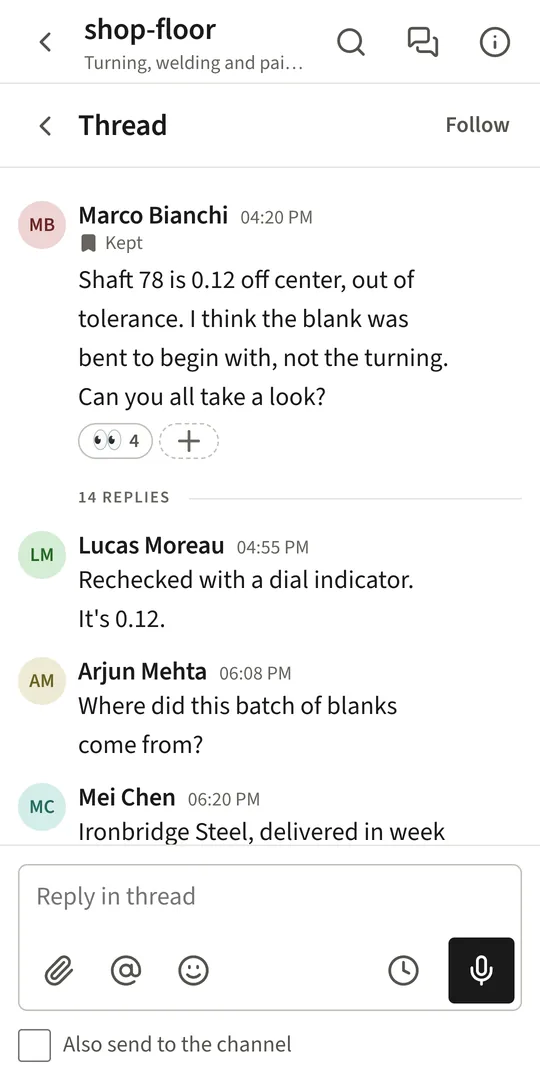
A thread on a phone, with its replies
  • Every screen, the same dayThe phone draws the same app as the web, so nothing on the desk is missing on the phone.
  • A tab bar under the thumbHome, Messages, Activity and Work.
  • Swipe backFollows the finger on an iPhone; Android's back closes one thing at a time.
  • Feels nativeHaptics, a launch screen, menus that rise from the bottom, and text that follows the phone's text size.
  • Folding phonesThe list and the conversation side by side on an opened fold.
  • Opens offline on AndroidThe newest messages of your last rooms, read only until the connection is back.
  • UpdatesThe Android app updates itself from a signed list; Google Play and TestFlight builds say when a newer one is waiting.
  • Any workspaceOne app: type your company's address the first time it opens.

On the desk

A real app for Mac and Windows.

Or open your company's address in any browser, with nothing to install.

  • Mac and WindowsApple silicon Macs, signed and notarised by Apple; Windows 10 and 11, 64-bit.
  • Its own menu and frameNo white title bar on a Mac, a drawn one on Windows, following light and dark.
  • Updates itselfDownloads in the background, checks the publisher's signature, then asks: Restart to update, or Later.
  • Keyboard firstj and k between messages, Esc to close, Cmd+F to search this room, and a list of every shortcut.
  • Compact readingSmaller, closer messages, so more of a room fits on one screen.
  • Opens offlineWith the messages it kept, and an offline page that keeps retrying.

Running the workspace

A console for whoever runs it.

Thirteen pages: Overview, Identity, People, Channels, Sidebar, Rules, Machines, Apps, Storage, Export, Conversations, Trail and Trash.

  • Getting startedA checklist: name, address, time zone, mark, the rooms everybody joins, people, and push.
  • Bring people inAn invitation link each, an account with a first password, or "Many at once" from pasted lines or a CSV file.
  • Move from Rocket.ChatOne command makes the accounts from an exported people file, with their photographs and the rooms they were in.
  • PeopleRoles, job title and department, names, rooms to add them to, and their devices, signed out one at a time.
  • Delete a personThey are signed out and leave every room; what they wrote stays under "Deleted user", and an owner can bring them back.
  • Channels and sidebarEvery room including private ones, the rooms everybody joins, and the sections everybody starts with.
  • Switch parts offCalls, direct messages, sending files, voice messages, reactions, editing, work, apps and bots, refused by the server, not only hidden.
  • RulesWho may do what, how long a message stays editable, who sees who has read, and whether authors delete their own.
  • Require two-step sign-inOf nobody, owners and admins, or everybody.
  • StorageHow much has been uploaded, where it sits, and what that is growing to.
  • ExportOne room or every room as a zip of pages that open without the app, a spreadsheet of its messages, and its files.
  • TrashDeleted rooms, messages and people, until you bring them back or remove them for good.
  • IdentityThe workspace's name, slogan, mark, address, time zone and language.

Apps and machines

Let your other systems talk.

Alerts, workflows and your own tools, each with only the access it was given.

  • Incoming webhooksPost into a room from anything; posts in Rocket.Chat's shape arrive unchanged.
  • Outgoing webhooksEvery delivery signed with a secret, so the receiver knows it came from your server.
  • BotsAccounts marked as bots, each kept to the rooms it was placed in.
  • An n8n nodeA node of its own for n8n workflows.
  • Apps from a manifestSlash commands, buttons and forms, installed from a manifest whose scopes are shown before you allow them.
  • Answers only you seeAn app's reply to a command or a button can be a line only the person who pressed it sees.

Privacy and the record

Said plainly, and kept honestly.

Every person can read, on their own Privacy page, what the people who run the workspace can see.

  • Every look is on the recordAn owner reads a conversation they are not in only with a written reason, read only, for an hour, and it goes in the trail.
  • Admins cannot read conversationsAn admin who is not an owner cannot read conversations or private rooms they are not in, by any path.
  • The trailSign-ins with the address and device, accounts and roles, rules, machines, and every look, read by owners and admins.
  • Nothing deleted on a clockMessages, files and the trail stay until an owner removes them by hand.
  • Told about a resetIf an admin resets your password, you are told who did it and when.
  • Two-step sign-inA code from any authenticator app, with ten recovery codes, and an eye on every password box.
  • Your devicesEvery device holding a session, each signed out on its own.
  • No ads, no trackingThe apps carry no advertising and no analytics; the publisher never sees your messages.

Languages and looks

English and Vietnamese, light and dark.

Written for each language, not translated word for word.

  • Two languagesThe workspace sets the language it reads in, and each person can choose another that follows them to every device.
  • Vietnamese that reads wellA typeface with its full Vietnamese set, and line heights that keep the marks clear of the next line.
  • Three looksQuire, Mono with your own code face, and Book, set larger for long reading.
  • Light, dark or SystemEach look has a night, and System follows your computer or phone.
  • Comfortable or CompactMessages at 17 with room between them, or at 15 and closer together.
  • MotionThings come and go with a short movement instead of in one frame.